
Projects Standard+
Lists the audio files in the project open in your DAW and keeps a searchable library of past projects — so you can find sounds used previously without even opening the DAW.
Support DAW’s
- Pro Tools, REAPER, Nuendo/Cubase, Premiere Pro, DaVinci Resolve (Studio)
Current tab
Lists the open project’s files, with the project name, count and DAW logo in the header (tooltip: full path, format, per-bucket counts).
Status icon per file: accent waveform = in your database, grey = project folder only, orange = offline. Group by Status in the “…” menu buckets them In Database / In Project Folder / Offline — offline files show only there. Offline respects Options -> Re-Mapping.
When a read project isn’t stored yet (and Auto-Store is off), a Store and Track banner appears on the Current tab — one click stores it now and keeps it current, the same as the “…” menu’s Store and Track Project. It clears once stored and only shows while the DAW is running.

Stored tab
Your library of past projects, and the point of the node — it works with no DAW running. Pinned projects first, then alphabetical.
The filter box searches every stored project at once. Type part of a filename and the list collapses to the projects that used it, auto-expanded. This answers “which of my old projects used this sound?” in one keystroke.
Send a found file into the open project: right-click -> Spot / Xfer to Current Project, the S / X keys, or drag it out. Opening a stored project lists only files still reachable.
Right-click a project’s top row for Show in Results, Create ‘Collection’ from Project, Pin / Unpin and Remove. Spot and Xfer live on the file rows only. Select several and Remove takes all of them; each row also has a hover X.

Storing projects
- Store and Track Project — adds the open project to the Stored list right away (no prompt) and keeps that entry current from then on.
- Auto-Store Projects — off by default. When on, each project you open is added automatically. Every stored project stays current either way; this only controls what gets auto-added.
- Reveal Project Location — opens the project’s own folder in Explorer / Finder.
(Not shown for DaVinci Resolve, which keeps projects in a database.) - Create ‘Collection’ from Project — writes a Collection of every readable file in the project, recallable from the Collections node.
Highlight color
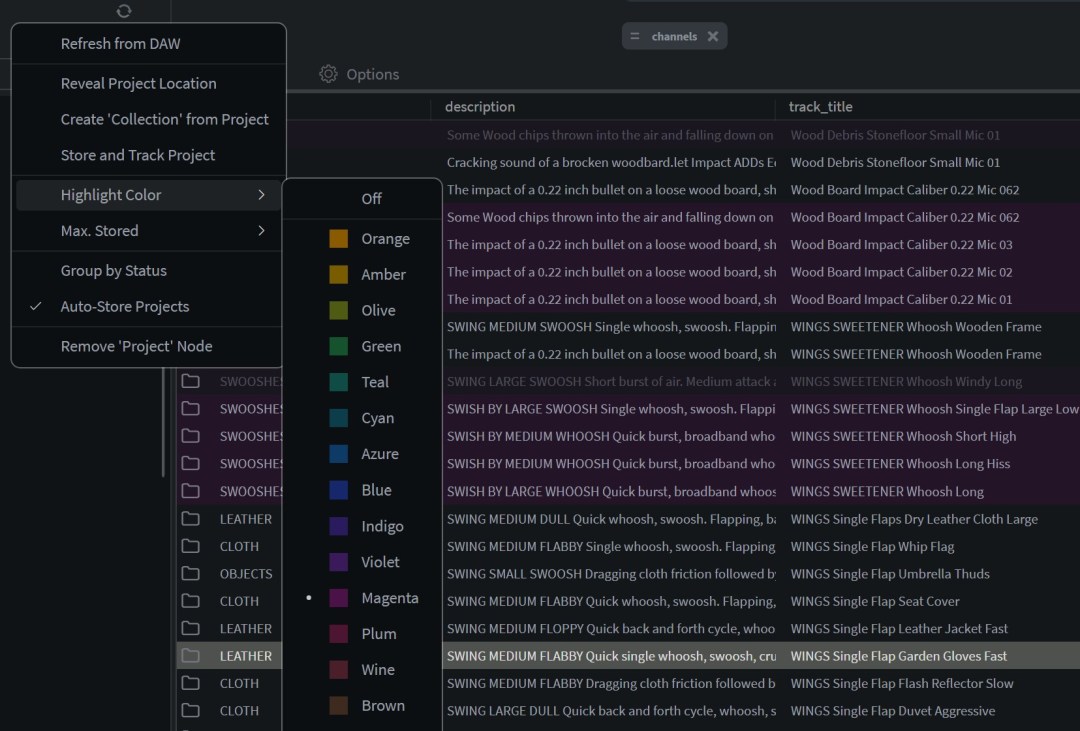
Highlight Color in the “…” menu offers 16 low-opacity colors plus Custom, tinting the Results rows that are in your open project. Pick Off at the top of the submenu to skip the tint and the in-session badge entirely. The same switch is mirrored as Disable Projects Highlight in Documents → Results List Options.
Keys & right-click
Current-tab rows: S spots the project-folder file (split sets per channel), T tags it, O opens its folder. X is blocked — the file is already in the project. Dragging Results rows onto the node does the same as X.
Right-click the Projects button on the node strip to Create ‘Projects’ Tab — a dockable tab holding the Projects node, like the other node buttons. (Not on Lite or Free.)
File matching
Matches by transfer history, then embedded identity (ISRC / UFID / UMID), then file path with drive re-mapping. Recognizes the DAW’s renamed “(N)” and sample-rate-converted copies, and matches split siblings to the set’s single record.