

Share Your Sounds with CloudShare
Send anyone a streaming link to your sounds, bounce through your rack with full Recall, spin AI variations of your own files… and run the License Server from any browser.
This release is about getting sounds out of basehead and back in. Share a library as a streaming link, bounce through your rack and recall it later, let the AI make new takes of a sound you love… plus a browser-based License Server admin and faster big libraries.
CloudShare & Quick Share.
The new Upload panel turns a Taglist, Collection, Group or Import into a streaming link. Whoever opens it searches and auditions your sounds right inside basehead… nothing to download. Host it on basehead’s Temp Storage, or on your own cloud storage — Wasabi, Amazon S3 or Google Cloud — and the link lasts as long as your files do. For people who don’t use basehead, Quick Share zips the files into a download link instead.
 Wasabi,
 Amazon S3 or
 Google Cloud — and the link lasts as long as your files do. For people who don’t use basehead, Quick Share zips the files into a download link instead.
- CloudShare
- View → Upload Panel. Use basehead’s Temp Storage (7 days) or your own Wasabi, Amazon S3 or Google Cloud bucket.
- Open a link
- Database → Open CloudShare Link… (or paste it in the search bar) and add it as an Import, a TagList or the sender’s Collection.
- Quick Share
- Right-click in Results, the Taglist Share button, or right-click a Collection. Optional FLAC for a smaller download.
- Your bucket
- Pick it from a list, the region is found for you, and Browse bucket… lets you re-copy links or clean up old shares.
- Editions
- Lite and up.

The Local API & MCP.

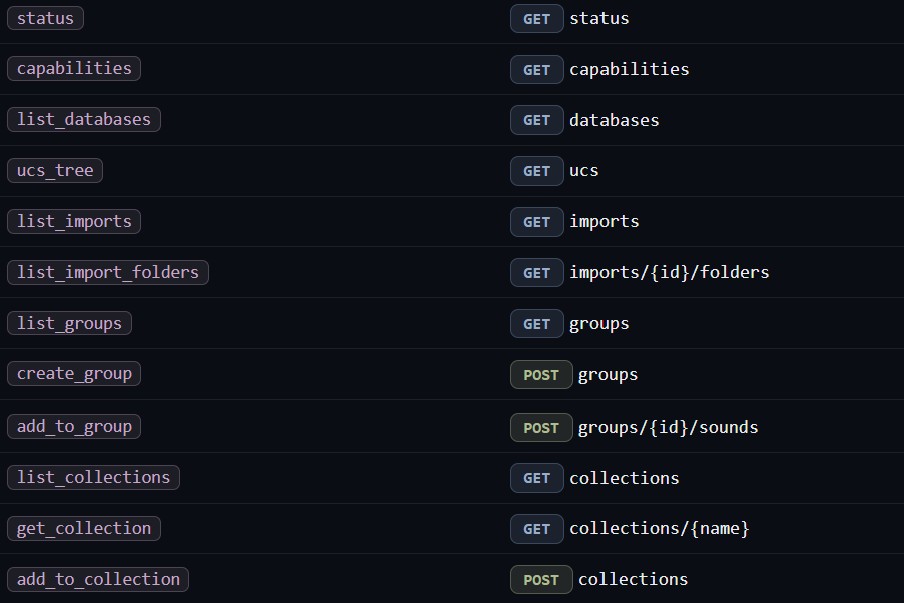
Your own tools and AI agents can now talk to basehead. Search a library, browse Imports, Groups and Collections, import new files, add sounds to Groups and Collections, transfer files or send them straight to your DAW… all through a small HTTP server that runs on your own machine.
- Local only
- Runs inside basehead on
127.0.0.1. Off by default… turn it on in Options → API Keys → Local API. - MCP
- The same commands as MCP tools, so Claude and other AI agents can drive basehead directly.
- You stay in charge
- A token you copy once, and a purple ‘Local API’ notice with a Turn Off button whenever something calls in.
- Building something?
- Tell us what you plan to make… it helps us decide what ships first.
Bounce Audio & Recall.
Render the selected sound through your live Process rack — VST3 plugins, pitch, speed and stretch — into a new file. A small recall file rides along, so months later one click puts the exact rack and settings back on the original.
- Bounce
- Actions → Bounce Audio… (Ctrl/Cmd+Shift+B). Name it with UCS, pick a destination, done.
- Recall
- Ctrl/Cmd+Shift+R brings back the source, pitch, selection and (if you want) the plugins. The waveform turns green so you know you’re in a recall.
- Straight into the database
- Bounces, Performance takes and TWEAKER takes land in a Bounce Library Import automatically… ready to search.
- Paths node
- Now has categories — Transfers, Bounces, Performances — so every folder basehead writes to is set in one place.

The Variator.
Pick a sound, hit Generate, and the AI makes new takes that sound like the original but differ. Great for round-robins, layers and “one more like that, please.”
- How
- Generator panel → Variator. Set Close ↔ Loose similarity and how many takes.
- Powered by
- Stability AI (Stable Audio, the stable-audio-3 model). Add your own Stability key in Options → API Keys… credits are per take.
- Every take its own file
_var01,_var02… each with its own seed, and all the source’s metadata carried over.- Any source
- Local files, split (multi-mono) sets, CloudPacks and store sounds.
- SFX provider
- SFX mode can now use Stability as well as ElevenLabs. Out of credits? A Get credits… button takes you straight there.

WebAdmin for the LLS and TEAMS.
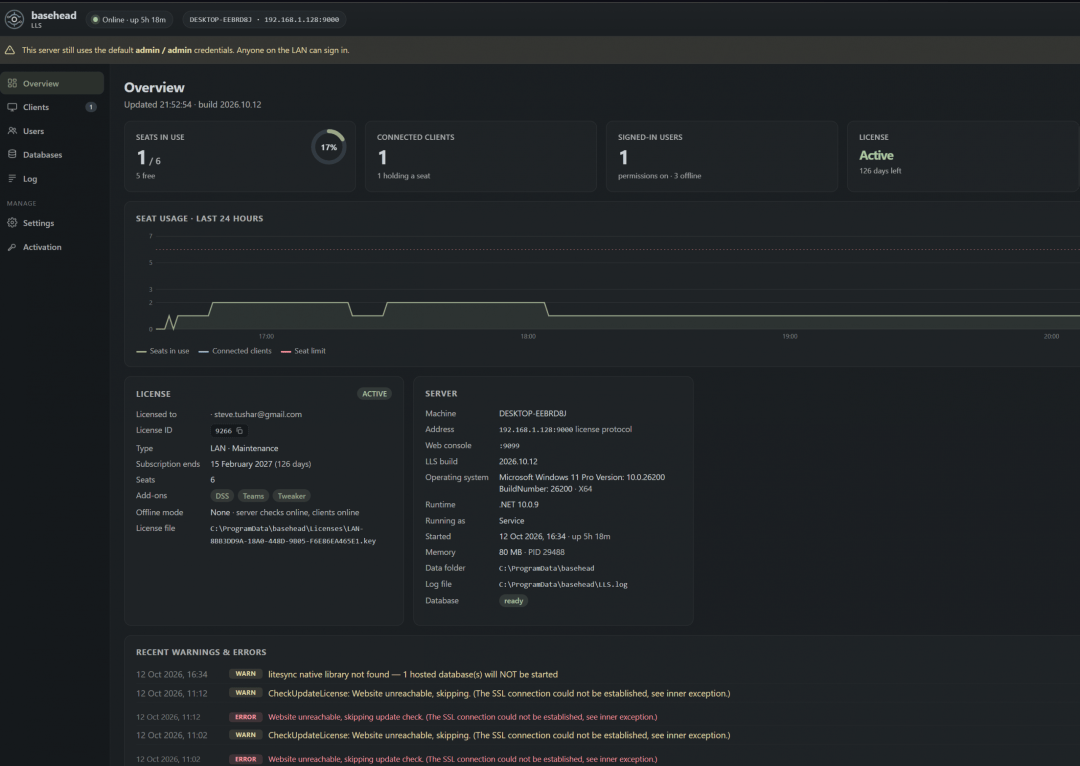
The LAN License Server now has a full admin console in your browser — no console window, no remote desktop. And with TEAMS, the server can host shared databases itself, so they stay online when every workstation is off.
- WebAdmin
- Seats, clients, users and teams, live log, settings and license activation from any browser on the LAN (port 9099).
- Mix & match editions
- One License Server can hold keys for different editions (say Ultra + Lite). Seats are pooled into one Total Seats count, and basehead tells a user when their seat moves up or down an edition.
- Hosted databases
- Host a database on the LLS, with daily backups you control.
- Database Sharing rule
- Decide whether workstations, the LLS, or both may share databases.
- DSS by hostname
- Manual shares connect by machine name and reconnect on their own after a router restart.
Faster on big libraries.
Folder clicks on large Imports are much quicker, searches now run in the background so a slow one won’t lock up the app, and paging through big result sets is smoother.
- Folder clicks
- Much faster on large Imports. Very big folders page automatically… hold Ctrl/Cmd to load everything.
- Scrolling
- No more freezes when files live on offline servers or unmounted drives.
- Waveforms
- Build All Waveforms is far more stable on big and multichannel libraries.
- Markers
- Saving markers on big files is much faster.
Grab the update.
A free update for everyone on current maintenance.