
Local API Setup Ultra

Let your own tools and AI agents search, import and transfer through basehead. It runs inside basehead on your own computer… this page gets you connected. The full endpoint reference is on the Local API page.
- Local only — listens on
127.0.0.1, so only this computer can connect. - Off by default, Ultra only, and basehead must be running.
- Can’t do damage — no deleting, no settings changes, no metadata writes, no licensing.
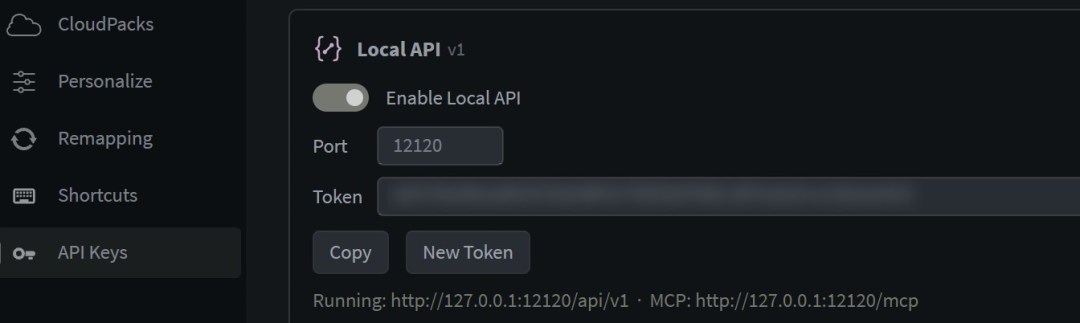
Turn it on
- Open Options → API Keys and find the Local API card (below the provider keys).
- Switch on Enable Local API. The port defaults to
12120(any 1024–65535 works). - Click Copy next to the Token. Your tool sends it with every request.
The status line shows Running: http://127.0.0.1:12120/api/v1 · MCP: http://127.0.0.1:12120/mcp, or Couldn’t start: <reason>. New Token cuts off anything using the old one.
Your first call
macOS / Linux (Terminal)
curl -H "Authorization: Bearer <token>" http://127.0.0.1:12120/api/v1/statusWindows (PowerShell)
Invoke-RestMethod http://127.0.0.1:12120/api/v1/status -Headers @{ Authorization = "Bearer <token>" }You should get back something like:
{"version":"2026.11.02","database":"Main Library","target_app":"REAPER","target_running":true}Common answers
| Code | Means |
|---|---|
401 | Missing or wrong token… copy it again from Options. |
403 | Not Ultra. |
404 | Unknown endpoint, or the id wasn’t found. |
409 | basehead is busy (an import or transfer is running). For xfer: no target DAW set, or it isn’t running. |
400 | Bad request… the reply says what’s wrong. |
Connect an AI agent (MCP)
The same commands are available as MCP tools at http://127.0.0.1:12120/mcp (streamable HTTP, same token). For Claude Code:
claude mcp add --transport http basehead http://127.0.0.1:12120/mcp \
  --header "Authorization: Bearer <token>"
Start a new session and try: “use basehead to find 5 stereo door slams under 3 seconds and show them in basehead.” Any MCP client that supports HTTP servers with a header connects the same way.
What you see in basehead
Every call pops a purple Local API: <function> notice saying whether an outside app or an AI agent (MCP) sent it, with a Turn Off button that switches the API off. You get at most one notice per function every 10 seconds, and they’re kept in the Notifications drawer too.
Troubleshooting
- “Couldn’t start … address already in use” — another app has that port. Pick a different one.
- No Local API card — your license isn’t Ultra.
xferreturns 409 — set your DAW in Options → Target Apps and make sure it’s running.- Need details? — in the Log panel, filter on
LocalApi. Each call logs a start and a result line.
Next: every endpoint, request and response is on the Local API reference.